New Relic
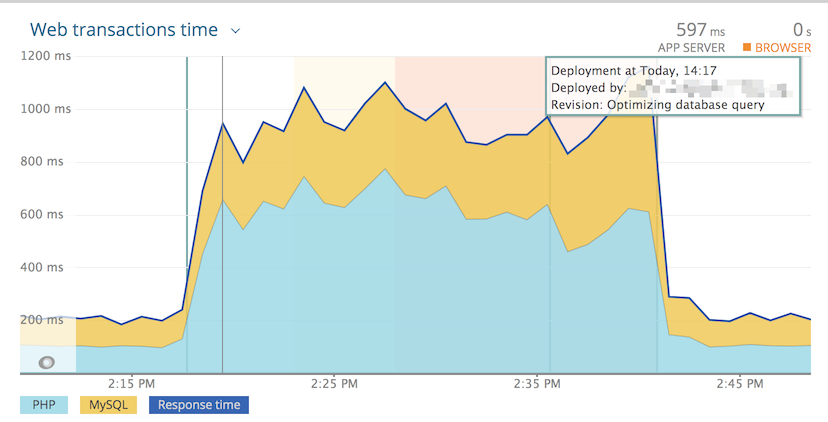
The New Relic channel records each deployment as a deployment marker in New Relic APM, so you can line up a code change with the performance data around it.
This page is for the lead or DevOps engineer who sends deployment markers to New Relic. It covers the setup steps, every variable the channel reads, and how the channel finds the New Relic application.
Setup
To set up New Relic notifications, complete these steps:
- Create a New Relic User API
Key
(format:
NRAK-XXXXXXXXXXXXXXXXXXXXXX). - In the hosting environment variables of each environment where New Relic
APM is configured, such as production and staging, set
NEWRELIC_ENABLED(orVORTEX_NOTIFY_NEWRELIC_ENABLED) totrue. Leave it unset everywhere else, so other environments make no API calls. The channel treats any non-empty value as on, includingfalseand0. When both variables are set,VORTEX_NOTIFY_NEWRELIC_ENABLEDwins. - Add
VORTEX_NOTIFY_NEWRELIC_USER_KEYto your hosting provider's environment variables. Without it, the channel falls back toNEWRELIC_USER_KEY. - Add
newrelicto the comma-separatedVORTEX_NOTIFY_CHANNELSlist in your.envfile, for exampleVORTEX_NOTIFY_CHANNELS=email,newrelic.
Confirm that the next deployment of a branch in
VORTEX_NOTIFY_NEWRELIC_BRANCHES recorded a marker. The deployment output
on your hosting platform shows
Created a deployment notification for application, then
[ OK ] Finished New Relic notification., and the marker appears on the
application's charts in New Relic.
Environment variables
See the Notifications overview for the router, what a failed
channel stops, the shared VORTEX_NOTIFY_* variables, and the Location
column. The following table lists the variables that the New Relic channel
reads:
| Variable | Required | Default | Location | Description |
|---|---|---|---|---|
VORTEX_NOTIFY_NEWRELIC_ENABLED | Yes, unless NEWRELIC_ENABLED is set | NEWRELIC_ENABLED | Hosting | Turns the channel on; any non-empty value counts |
VORTEX_NOTIFY_NEWRELIC_USER_KEY | Yes, unless NEWRELIC_USER_KEY is set | NEWRELIC_USER_KEY | Hosting | New Relic User API Key |
VORTEX_NOTIFY_NEWRELIC_PROJECT | No | VORTEX_NOTIFY_PROJECT | .env | Project name |
VORTEX_NOTIFY_NEWRELIC_APP_NAME | No | <project>-<label> | .env | Application name as it appears in New Relic |
VORTEX_NOTIFY_NEWRELIC_APPID | No | Looked up by application name | .env | Application ID |
VORTEX_NOTIFY_NEWRELIC_DESCRIPTION | No | Default template | .env | Deployment description |
VORTEX_NOTIFY_NEWRELIC_CHANGELOG | No | Description | .env | Deployment changelog |
VORTEX_NOTIFY_NEWRELIC_USER | No | Deployment robot | .env | User performing deployment |
VORTEX_NOTIFY_NEWRELIC_REVISION | No | VORTEX_NOTIFY_NEWRELIC_SHA, or <label>-<date>-<time> without one | Hosting | Deployment revision |
VORTEX_NOTIFY_NEWRELIC_ENDPOINT | No | https://api.newrelic.com/v2 | .env | API endpoint |
VORTEX_NOTIFY_NEWRELIC_BRANCHES | No | main,master,develop | .env | Exact branch names to record (comma-separated); empty falls back to the default |
VORTEX_NOTIFY_NEWRELIC_LABEL | No | VORTEX_NOTIFY_LABEL | Hosting | Deployment label |
VORTEX_NOTIFY_NEWRELIC_SHA | No | VORTEX_NOTIFY_SHA | Hosting | Commit SHA used as the revision |
VORTEX_NOTIFY_NEWRELIC_ENVIRONMENT_URL | No | VORTEX_NOTIFY_ENVIRONMENT_URL | Hosting | Environment URL |
VORTEX_NOTIFY_NEWRELIC_LOGIN_URL | No | VORTEX_NOTIFY_LOGIN_URL | Hosting | Login URL |
VORTEX_NOTIFY_NEWRELIC_EVENT | No | VORTEX_NOTIFY_EVENT, then post_deployment | Hosting | Deployment event; pre_deployment records nothing |
The default application name joins VORTEX_NOTIFY_NEWRELIC_PROJECT and
VORTEX_NOTIFY_NEWRELIC_LABEL with a hyphen. These default to the project
name and the deployment label, so a main deployment of your_site looks
for your_site-main.
When VORTEX_NOTIFY_NEWRELIC_APPID is empty, the channel looks the
application up by name. If no application matches, it skips the
notification and passes, which is what you want in environments New Relic
doesn't monitor. An explicit numeric ID skips that lookup, so an ID that
matches no application fails the channel.
The channel fails when New Relic doesn't answer the marker request with
HTTP 201. Like most channels, it skips pre_deployment.
An empty VORTEX_NOTIFY_NEWRELIC_BRANCHES falls back to the default list,
so list every branch that should record a marker.
Example
The following chart shows a deployment marker with its time, user, and revision: